

On Apple TV: widgets, Top Shelf, and a new look
Video Wall for Apple TV 2.4.0 is out. Update from the App Store, or let automatic updates do it, and your wall picks up widgets, your cameras land on the Apple TV home screen, and there are new ways to fit and space the tiles. The new wall options start switched off, so your wall looks exactly as you left it until you choose otherwise.
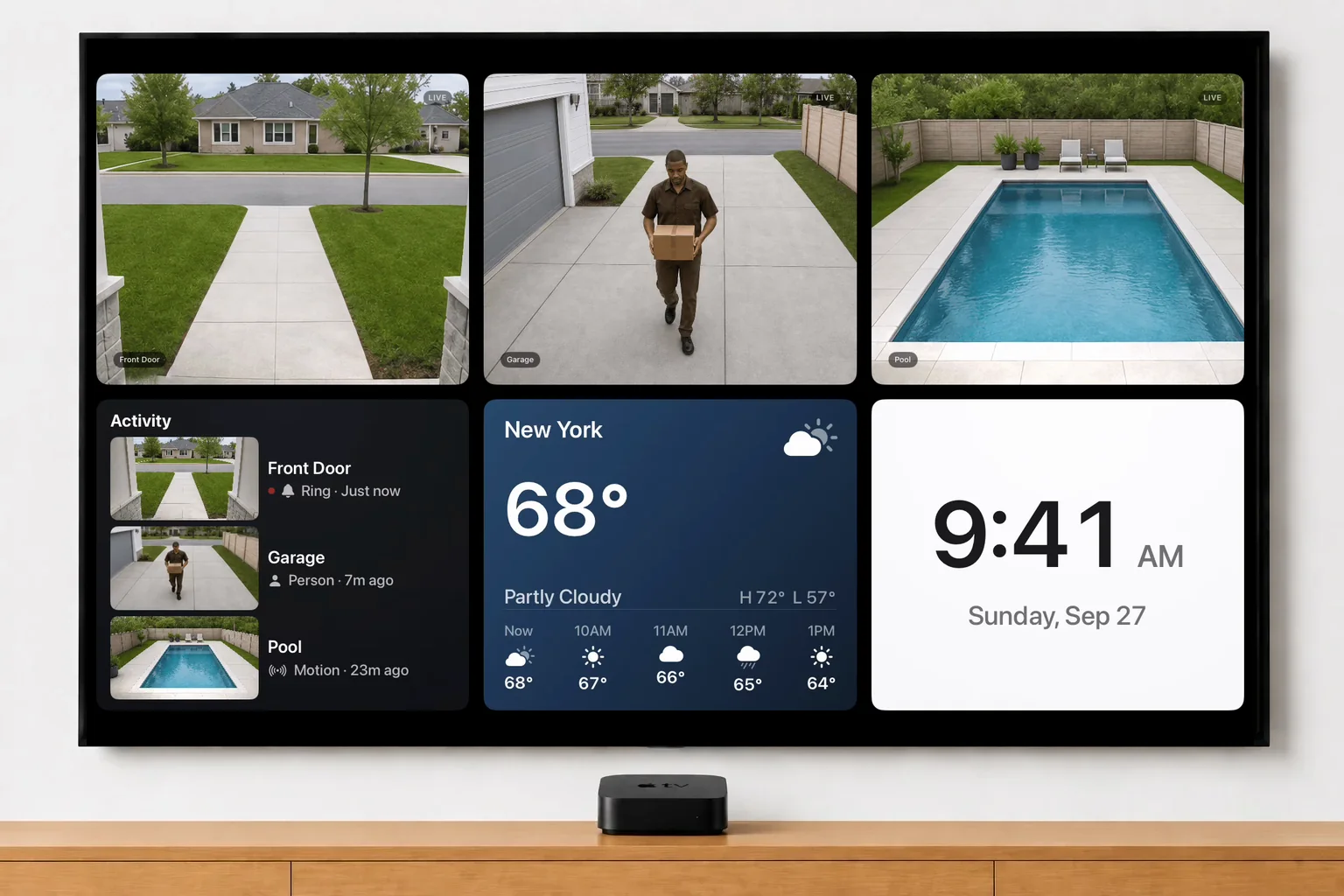
Widgets on the wall
A clock, your local weather and a live Activity feed can now sit on the wall beside your cameras. Activity lists the latest motion and doorbell events across your cameras, each with a snapshot, and picks up new ones within about half a minute. Select any widget to open it full screen, where Activity has the whole list.
Turn them on in Settings → Widgets. Weather takes a US ZIP code on the on-screen keypad. Once a widget is on, it sits in Settings → Cameras with your cameras, so you move it or hide it the same way. How to add a widget.
Your cameras on the home screen
Keep Video Wall in the top row of your Apple TV home screen and your cameras appear in the Top Shelf above it, each with a recent snapshot. Select one and you’re straight into that camera, full screen, without opening the wall first.
Make it yours
- Camera fit. Fill every tile edge to edge, show each camera’s whole picture, or leave it on Auto and let the wall choose per camera. It’s in Settings → Display. More on Camera fit.
- Tile spacing. Normal, Tight, or None, which runs the tiles edge to edge with square corners for a clean security-console look.
- Play/Pause now pauses a live camera in full screen.
Easier every day
Settings are reorganized into clear sections: Cameras, Widgets, Auto-Cycle, Display, Devices, Subscription, Help and Account. Back always takes you one step back, and from the top of Settings it returns to the wall. The tips moved to Settings → Help. Full screen now opens instantly instead of reconnecting, the sidebar moves more smoothly, and focus is crisper on every tile.
A new icon
The app has a new icon: a TV with six colored tiles, one for each camera on your wall. You’ll see it on your home screen after the update, and it’s the mark on this site now too.
Widgets are on Apple TV and in the web app today. Fire TV, Google TV and Roku are next. The update is free for everyone on a trial or plan.
New features, new platforms and tips for your wall, about once a month. Unsubscribe anytime.